Screening
Check that an enquiry can be quoted and is within Score's scope of supply, then proceed, clarify or decline.
Screening answers two questions for every enquiry: is there enough information to quote it, and is it within Score's scope of supply. It runs automatically when an enquiry arrives. You make the decision.
How it works
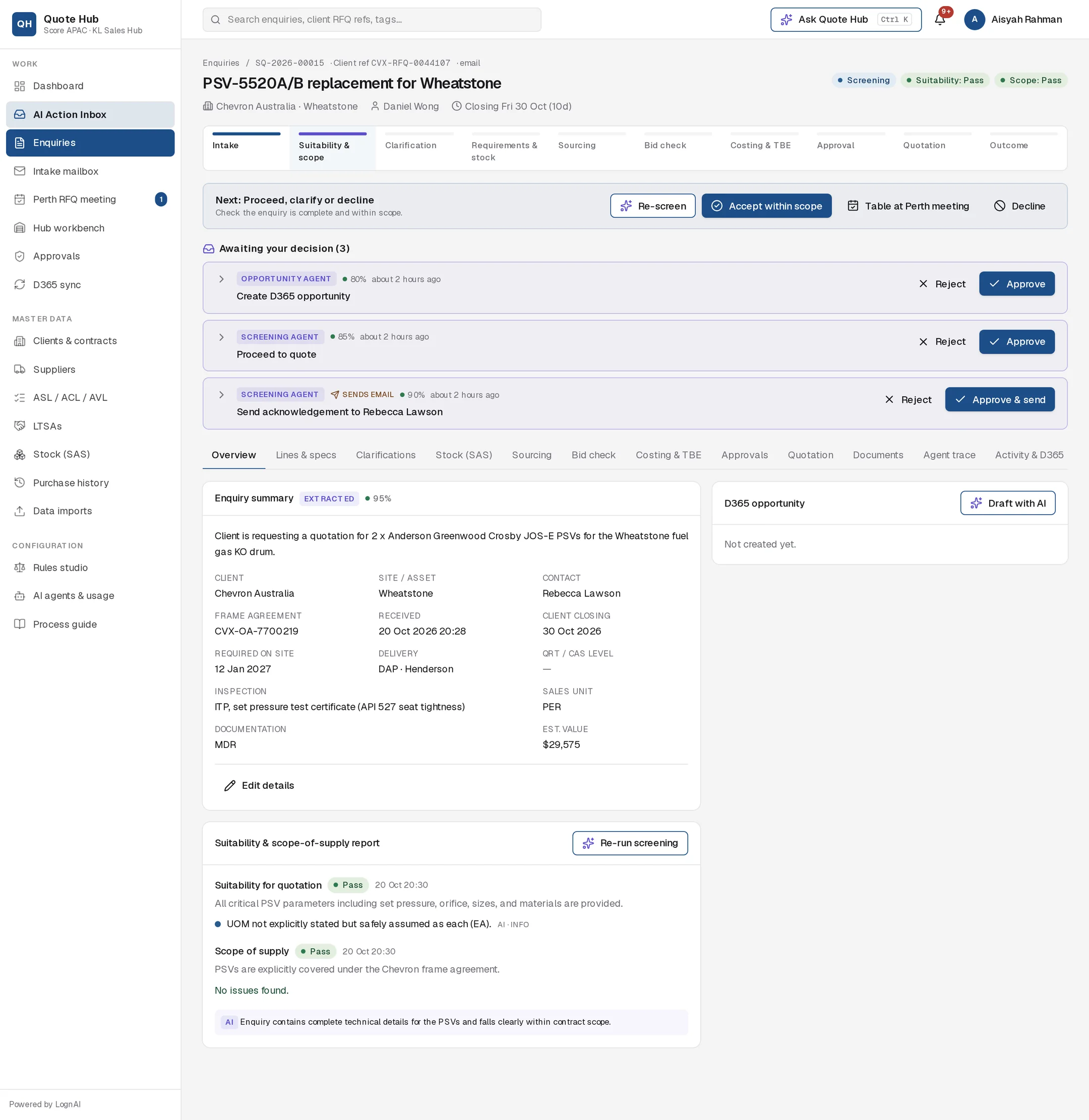
Quote Hub first checks the enquiry against the ground rules. The Screening Agent then reviews the enquiry for anything a buyer would trip over. The result is two verdicts, shown as pills in the header and in the Suitability & scope-of-supply report on the Overview tab.
| Verdict | Meaning |
|---|---|
| Pass | Enough information to quote / within scope. |
| Ambiguous | Something is missing or unclear and needs a question to the client or a senior call. |
| Fail | Cannot be quoted / outside scope. |
The agent can raise a Pass to Ambiguous. It never lowers a rule's Fail. Each finding in the report shows whether it came from a rule (with the rule code) or from AI, and its severity. Where a finding can be resolved by the client, the report shows a suggested question, starting Ask:.
Ground rules
These are the starting rules. Administrators change them in the Rules studio.
| Code | Check | Result |
|---|---|---|
| S01 | No quotable lines found | Fail |
| S02 | No closing date | Ambiguous |
| S03 | Closing in less than 2 days | Ambiguous |
| S04 | A line has no quantity, or zero | Ambiguous |
| S05 | A line has no OEM part number, model or client material number | Ambiguous |
| S06 | A PSV has no set pressure, orifice or size | Ambiguous |
| S07 | A valve has no size or pressure class | Ambiguous |
| S08 | A spare has no model or part number for the parent valve | Warning |
| S09 | Sender not matched to a client | Ambiguous |
| S10 | Woodside enquiry with no QRT/CAS level | Warning |
| S11 | PSVs or valves with no datasheet attached | Warning |
| C01 | Pumps, compressors, instruments, electrical, chemicals or services | Fail |
| C02 | A line is not a valve, PSV or valve spare | Ambiguous |
| C03 | No active frame agreement (spot quotation on Score terms) | Info |
| C04 | Product type not covered by the client's frame agreement | Ambiguous |
| C05 | Delivery outside Australia, NZ, PNG, Timor-Leste or Malaysia | Warning |
Proposes the next steps, each as a card under Awaiting your decision:
- Proceed to quote when the enquiry is clear
- Send acknowledgement to the client contact, confirming receipt
- Ask the client a set of clarification questions
- Add to today's Perth meeting when an ambiguity needs a senior judgement
- No-quote line … when only some lines are outside scope
- Decline — outside scope of supply with a draft email, when the whole enquiry is outside scope
It also starts the Opportunity Agent. Re-screening replaces any of these cards you have not yet decided.
Make the decision
Use the AI cards, or the buttons on the Next: bar.
| Button | What happens |
|---|---|
| Accept within scope | Both verdicts become Pass, the enquiry moves to Requirements review and the stock check starts. |
| Table at Perth meeting | Adds the enquiry to today's agenda with your note. See Perth RFQ meeting. |
| Decline | Opens the decline email. See below. |
| Re-screen | Runs the rules and the Screening Agent again, for example after you edit lines. |
To ask the client questions, approve the clarification card or see Asking the client.
Decline an enquiry
Open the dialog
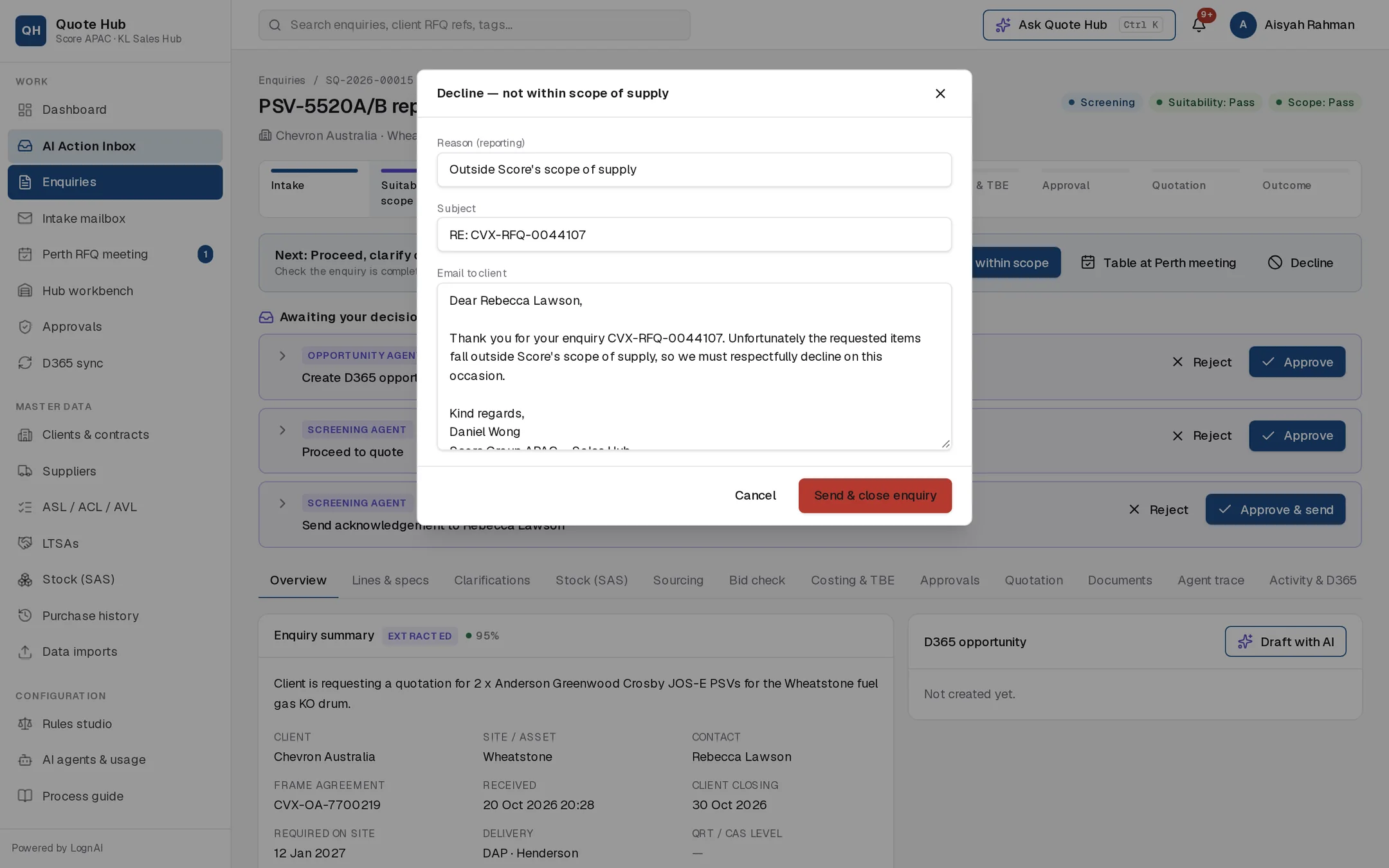
Select Decline on the Next: bar.
Check the email
Edit the Reason (reporting), the subject and the email to the client.
Send
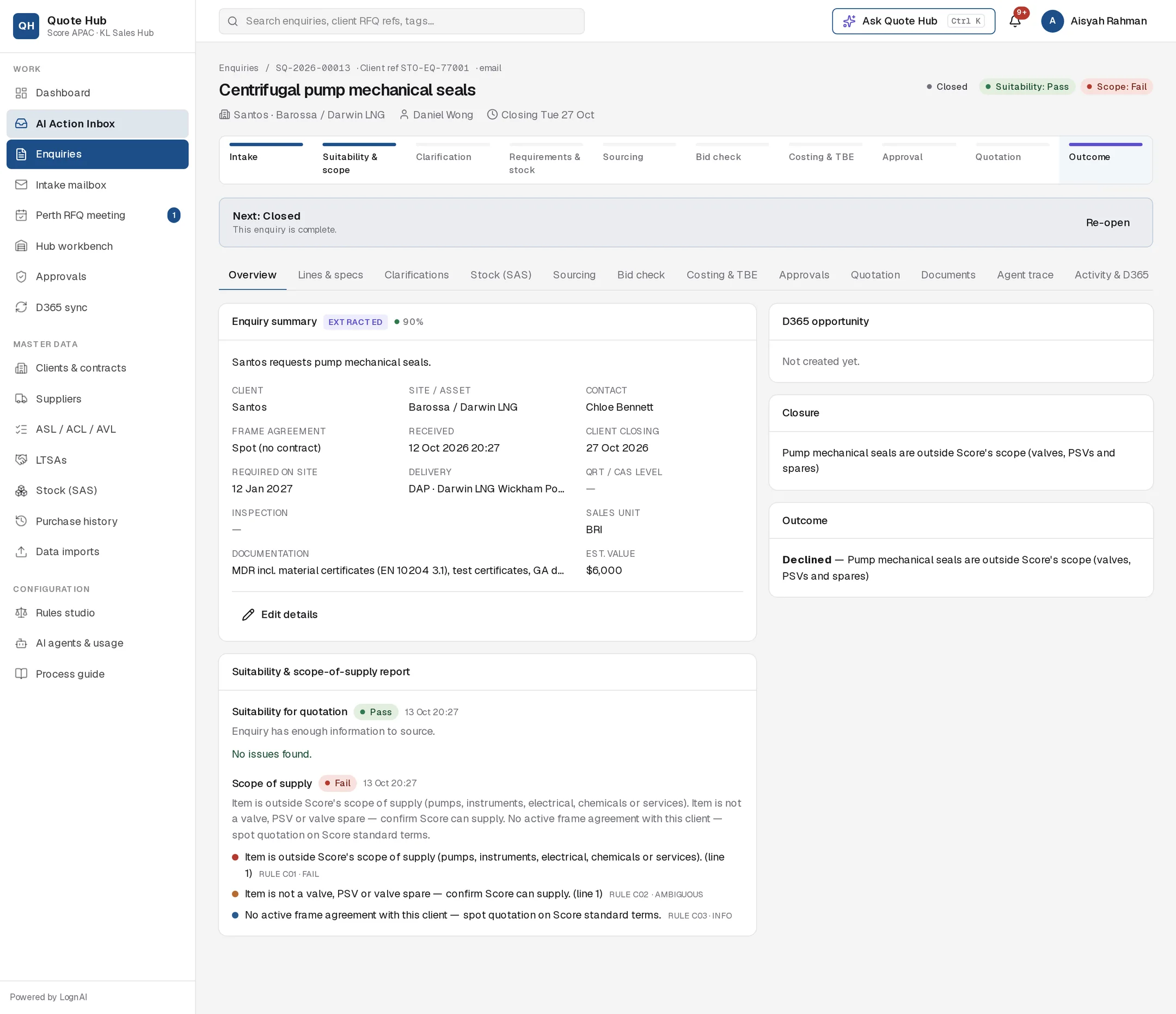
Select Send & close enquiry. The email goes to the client contact and the enquiry closes with the scope verdict set to Fail.
Good to know
- Part of the enquiry out of scope. Score no-quotes those lines and quotes the rest. Approving the no-quote card marks the lines no quote with the reason shown on the quotation. You can also mark a line yourself on Lines and specs.
- Acknowledgement. Approving the acknowledgement card emails the client contact and creates the enquiry's OneDrive folder. It is proposed once per enquiry.
- A closed enquiry stays available for reporting. Select Re-open to bring it back to Requirements review.
- Emails need a client contact with an email address on the enquiry.