Rules studio
Maintain the ground rules that check every enquiry for suitability and scope of supply.
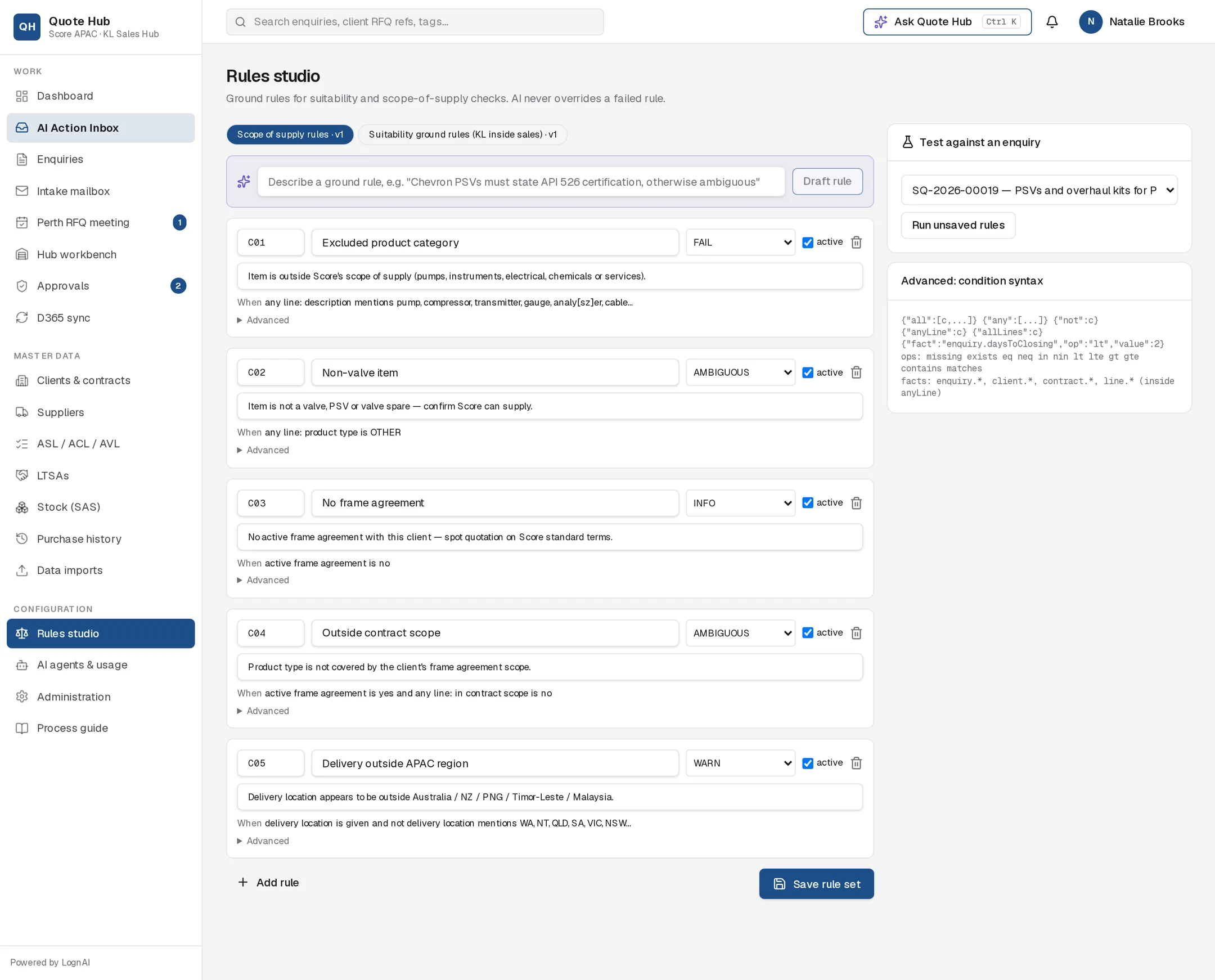
Ground rules are the fixed checks Quote Hub runs on every enquiry at screening. The Rules studio is where the inside sales team writes, tests and switches them on or off. AI never overrides a failed rule.
How it works
There are two rule sets, shown as pills at the top with their version:
- Suitability ground rules (KL inside sales): is the enquiry complete enough to quote? For example closing date missing, PSV sizing data incomplete, item not identifiable.
- Scope of supply rules: is it something Score supplies? For example excluded product category, outside contract scope, delivery outside the APAC region.
When an enquiry is screened, every active rule in both sets is checked. Each rule that matches adds a finding with its message to the screening report. See Screening.
Outcomes
| Outcome | Effect on the verdict | Use for |
|---|---|---|
| FAIL | Verdict becomes Fail | Cannot quote or clearly out of scope |
| AMBIGUOUS | Verdict becomes Ambiguous, unless another rule failed | Needs the client or the Perth RFQ meeting to decide |
| WARN | None; shown as a warning | Something the sales engineer should check |
| INFO | None; shown for information | Context, such as "no frame agreement" |
The Screening Agent then reviews the enquiry. Its assessment can make a verdict stricter, never more lenient than the rules.
Reading a rule
Each rule card shows:
- Code and name, for example C01 Excluded product category.
- Outcome: FAIL, AMBIGUOUS, WARN or INFO.
- active: untick to switch the rule off without deleting it. Inactive rules are greyed out.
- Message: the text shown in the screening report.
- When: the condition in plain words, for example "any line: product type is OTHER".
- Advanced: expand to see and edit the condition in its exact form. The Advanced: condition syntax panel on the right lists what conditions can use.
Change a rule set
Pick the set
Select the rule set pill at the top.
Edit, add or remove rules
Change the code, name, outcome, message or active tick directly on the card. Select Add rule for a new WARN rule, or the bin icon to delete one.
Or draft a rule with AI
Describe the rule in the box at the top, for example "Chevron PSVs must state API 526 certification, otherwise ambiguous", and select Draft rule. The drafted rule is added to the bottom of the list for you to review. Check the When line before saving.
Test before saving
In Test against an enquiry, choose one of the 50 most recent enquiries and select Run unsaved rules. Quote Hub shows the resulting verdict and each active rule that matched, with line numbers where the rule applies to lines. Nothing is saved or changed on the enquiry.
Save
Select Save rule set. The set's version number goes up by one.
Good to know
- Anyone can draft and test rules. Saving needs the Sales engineer, Sales lead or Administrator role.
- Saved rules apply to the next screening. Enquiries already screened keep their findings until they are screened again.
- Save rule set saves only the set that is open. If you changed both sets, save each one. Unsaved changes are lost when you leave the page.
- Every save is recorded in the Audit log.