Costing & TBE
Build the sales costing sheet and technical bid evaluation, set margins and register deviations before approval.
The Costing & TBE tab holds the sales costing sheet and the technical bid evaluation (TBE) in one table. Quote Hub builds it as soon as you confirm the supplier selection, or when every line comes from stock.
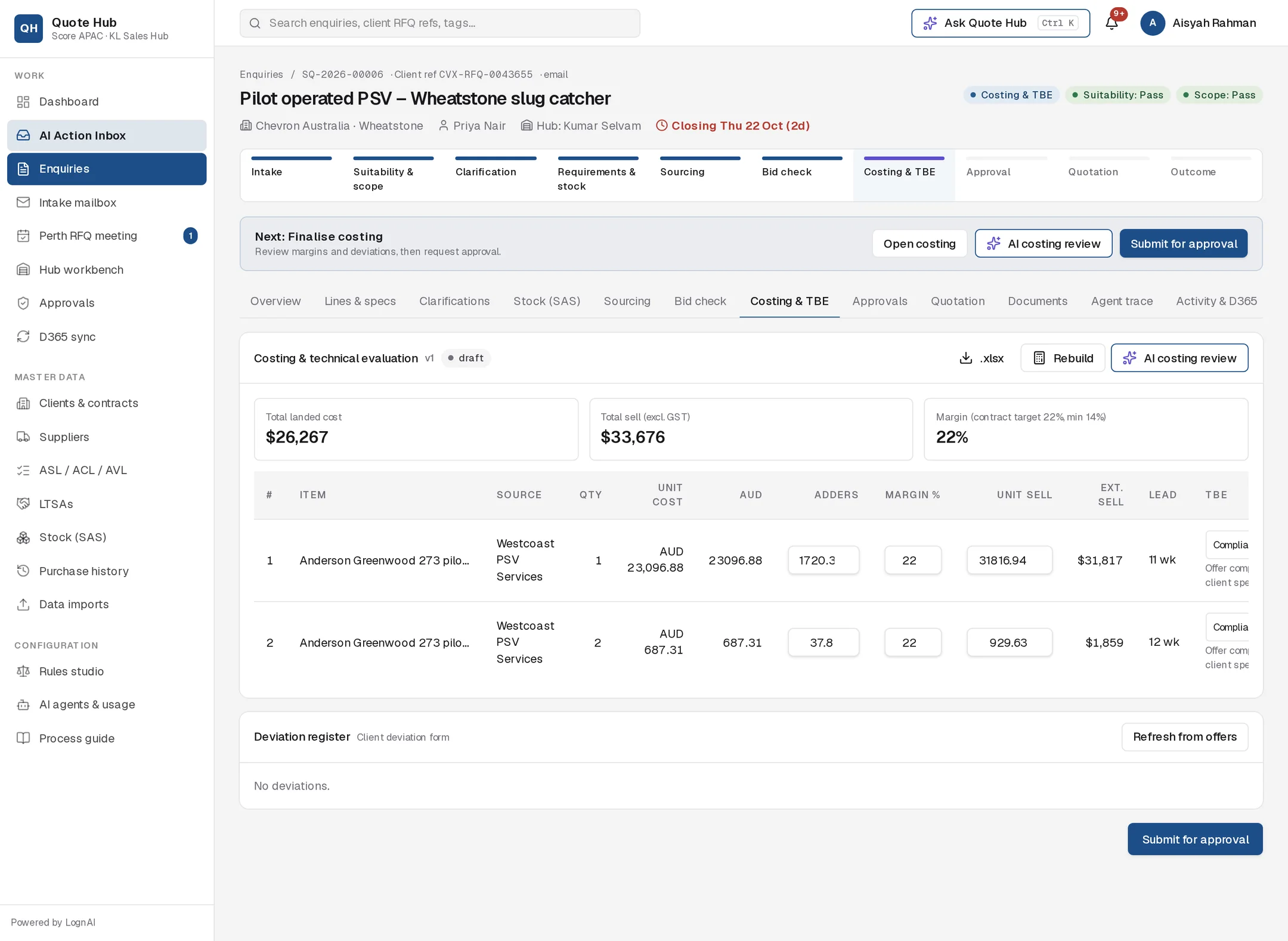
How a line is costed
Each line starts from the selected supplier offer or the SAS stock item:
- Unit cost in the supplier's currency is converted to AUD at the current exchange rate (shown as fx under the cost).
- Adders per unit are added: freight, duty, packing, contingency and inspection.
- The margin % is applied on sell: unit sell = (AUD cost + adders) ÷ (1 − margin).
Default policy
| Item | Default |
|---|---|
| Margin: spares | 28% |
| Margin: PSV | 24% |
| Margin: valve | 22% |
| Margin: other | 25% |
| Margin: stock items | 35% |
| Packing | 1.5% of unit cost |
| Freight | As quoted by the supplier, otherwise 4% of unit cost |
| Duty | 0% |
| Contingency | 0% of unit cost |
| Inspection | A$450 per line, spread across the quantity, when the line calls for witness, hydro, FAT, PMI or NDT |
When the client has a contract with a target margin, supplier-sourced lines use that target instead of the product-type margin. Administrators can change the policy in the Costing policy section of Administration.
Stock lines are costed at the SAS unit cost with packing, contingency and inspection adders, a one-week lead time and a TBE result of Compliant.
Lines partly from stock
A line routed Part stock is costed as one line in two parts. The stock quantity is priced at the SAS unit cost with the Score stock margin. The rest is priced at the selected supplier offer with the product or contract margin. The sheet shows the blended unit cost, adders and margin, marked part stock, with the source written out, for example "Score stock DAR (SAS-1013) ×2 + Emerson Automation Solutions (AU) ×3". The lead time is the supplier's, and the TBE result comes from the supplier offer.
If no supplier is selected for the remainder, only the stock part is costed and the TBE result shows Deviation with a note to select a supplier on Bid check.
The sheet
Three totals sit above the table: Total landed cost, Total sell (excl. GST) and Margin. If the enquiry has a contract, the margin card shows the contract target and minimum, and turns red below the minimum.
While the sheet is a draft you can edit, per line:
- Adders: change the AUD adders per unit.
- Margin %: unit sell is recalculated.
- Unit sell: margin is recalculated from the price you enter.
- TBE: set Compliant, Deviation or Not compliant. The note underneath explains the result.
Changes save when you leave the field. The table scrolls sideways on narrower screens. Once the sheet is submitted for approval it is locked.
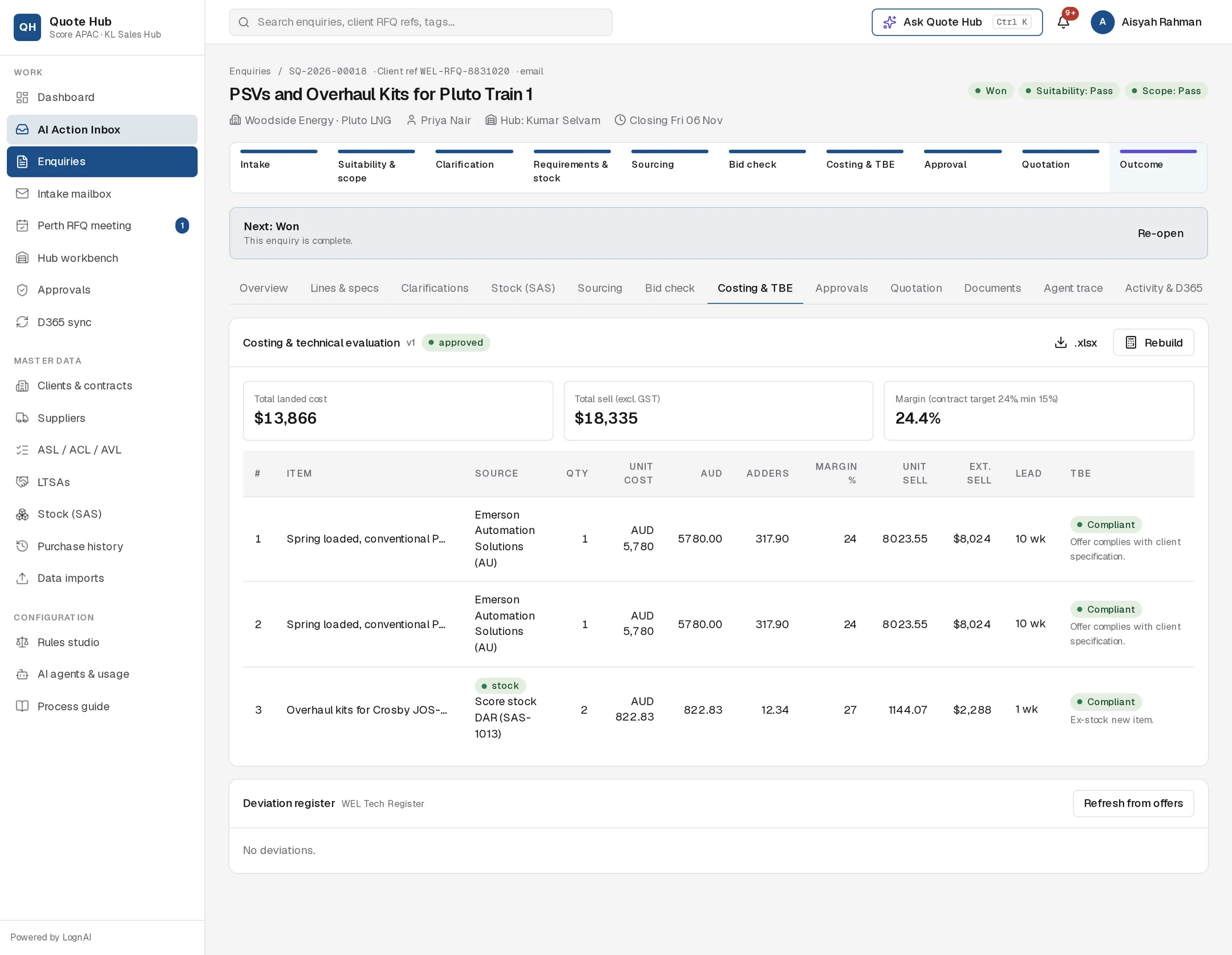
Deviation register
Deviations are added when you confirm a selection that includes offers marked deviation or alternate. Refresh from offers adds any that are missing. Select the pencil icon to edit the category, requirement, offered item, impact, engineering justification and status: Open, Submitted to client, Accepted by client, Rejected by client or Withdrawn. Categories are Material, Obsolete model, Lead time, Certification, Dimensions, Commercial and Other.
The register follows the deviation process set on the client record:
| Process | What changes |
|---|---|
| WEL Tech Register (Woodside) | Each deviation gets a WEL Tech Register reference and a WTA status (WTA pending, WTA approved, WTA rejected). Download with WEL register .xlsx |
| Client deviation form (Chevron) | Download with Deviation form .xlsx |
| Standard | Deviations are listed in the quotation |
See Quotation for how deviations go to the client.
Step by step
Review the sheet
Check sources, exchange rates, adders and lead times. Download with .xlsx if you need to work offline.
Run the AI costing review
Select AI costing review. The review also runs automatically after you confirm a supplier selection. Approve the proposal to apply its margins and TBE notes, or edit the margins first.
Rebuild if the selection changed
Select Rebuild to create a new version from the current stock decisions and supplier selection. Manual edits stay on the previous version.
Submit for approval
Select Submit for approval at the bottom of the tab or in the next-action bar. See Approvals.
Good to know
- The sheet is versioned (v1, v2…). Approvals always refer to the version that was submitted.
- If an approver rejects, the sheet goes back to draft so you can edit and resubmit.
- If the enquiry is at Approval, Ready to submit, Submitted or Deviation resolution and you rebuild the sheet, or a line's margin, adders or unit sell changes (including through an approved AI costing proposal), the enquiry returns to Costing & TBE. Pending and completed approvals are cancelled, an approved quotation that has not been sent goes back to draft, and you see Approval needed again. Submit for approval again when ready.