Agent trace
See every AI agent run on an enquiry, step by step, with the data it used and the proposals it made.
The Agent trace tab on an enquiry shows what each agent did and why. Use it to check how a recommendation was reached before you approve it, or to answer "who decided this?" after the fact.
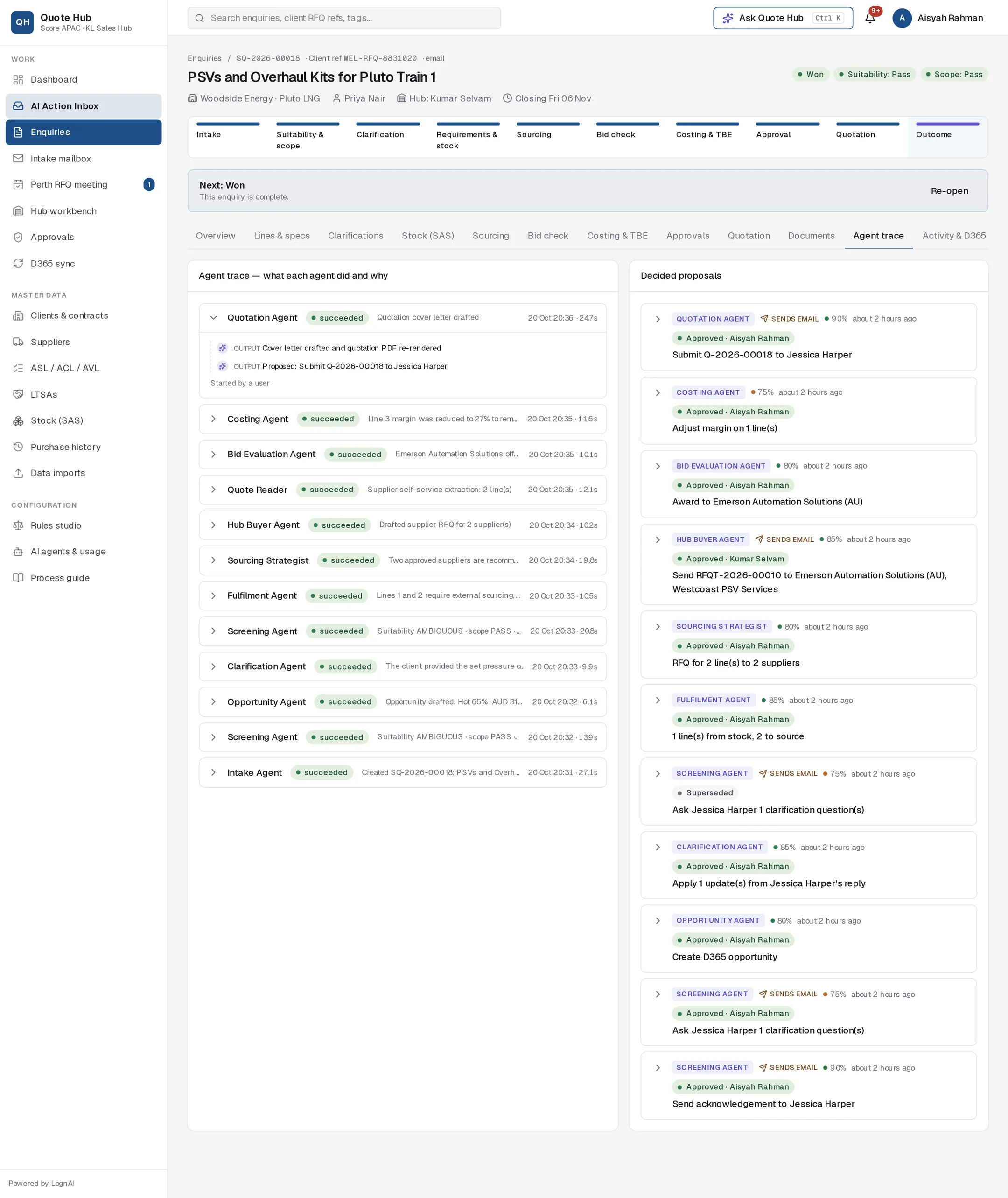
Agent runs
The left column lists the agent runs on the enquiry, newest first, up to the last 40. Each row shows:
| Item | Meaning |
|---|---|
| Agent | Which agent ran, for example Screening Agent or Quote Reader |
| Status | running, succeeded or failed |
| Summary | One line on the result, or the error if it failed |
| Time | Date and time the run started |
| Duration | How long the run took, in seconds |
The newest run opens automatically. Select any row to open or close it.
Steps in a run
An open run lists its steps in order. Each step has a type:
| Step | What it records |
|---|---|
| rule | A rule result, such as the supplier cascade or a screening rule |
| tool call | A lookup the agent made, such as an SAS search for one line |
| tool result | The data that came back, such as previous supply prices |
| thought | The agent's conclusion, such as the screening verdicts and recommendation |
| output | What it produced, including each proposal it made |
| error | Why the run stopped |
Select a step to see the data behind it: the stock matches it found, the price history it compared, the rule hits it applied.
The line at the bottom of an open run shows how it started: Started by a user for a button, or Started automatically.
Decided proposals
The right column lists the enquiry's proposals that are no longer pending, up to the last 40. Each card shows the agent, confidence, whether it sent an email, and its outcome:
- Approved, with the name of the person who approved it
- Rejected, with the reason given
- Failed, with the error
- Superseded, replaced by a newer proposal before anyone decided
Expand a card to see exactly what was approved, including any edits.
Why it matters
- Trust. You see the evidence behind each recommendation.
- Audit. Each approval, edit and rejection is tied to a named person and time. Approvals, approvals with edits and rejections are also listed on the enquiry's Activity & D365 tab.
- Fixing problems. A failed run shows the step where it stopped and the error.
Good to know
- A run still marked running after 20 minutes is marked failed with "Timed out".
- Copilot questions asked on the enquiry also appear here as Copilot runs.
- For usage and cost across all enquiries, see AI agents & usage.