Bid check
Compare supplier offers line by line in AUD and choose who supplies each item.
The Bid check tab is Quote Hub's Single Bid Check Sheet. It puts every supplier offer side by side, scores them and records which supplier you choose for each line. It fills in as soon as the first quote is recorded.
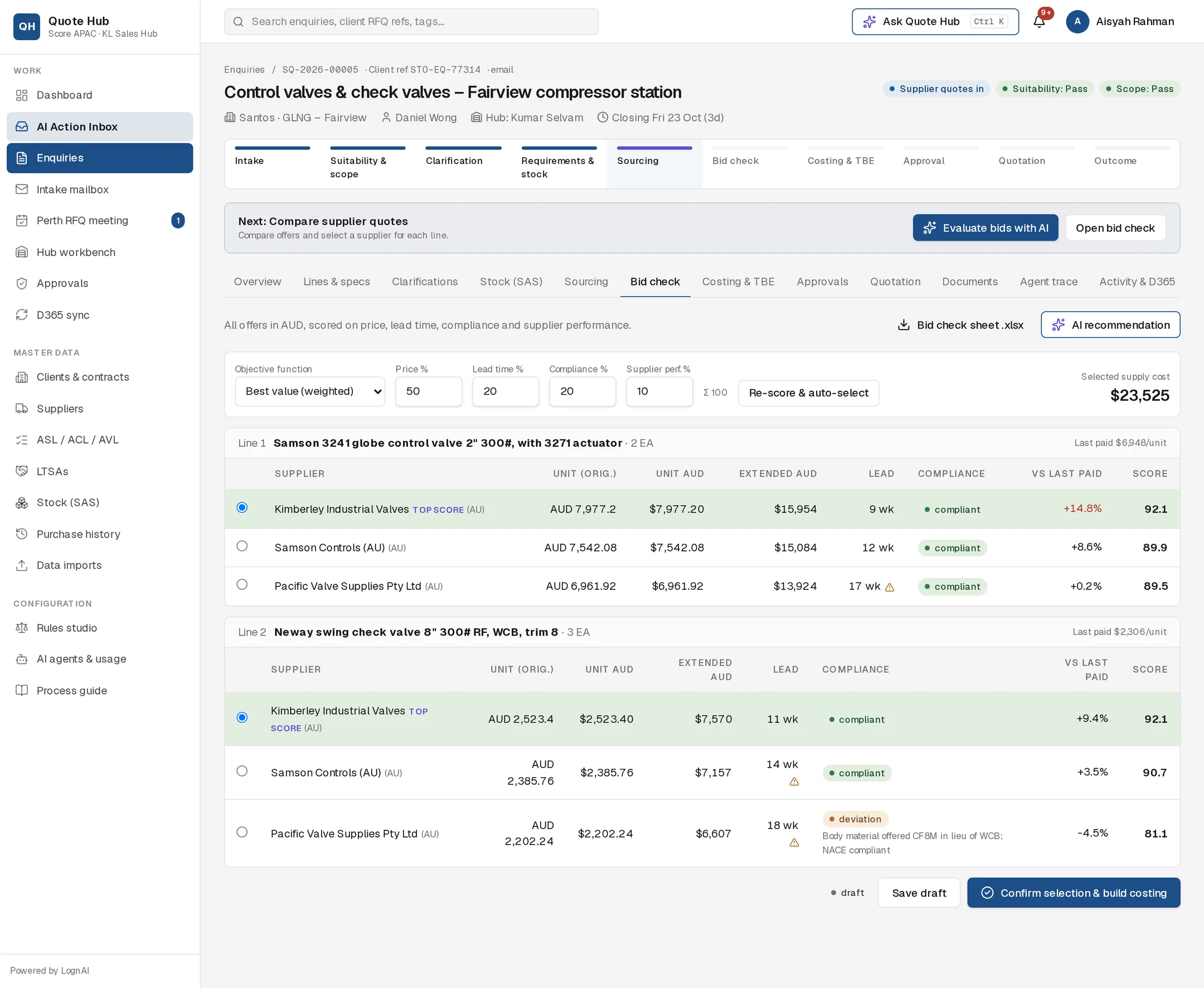
Reading the sheet
Each enquiry line has its own table, best score first. The line header shows the quantity, the last price Score paid for the part and a single bid tag when only one supplier quoted.
| Column | Meaning |
|---|---|
| Unit (orig.) | Price in the supplier's quoted currency |
| Unit AUD / Extended AUD | Converted to AUD, per unit and for the line quantity |
| Lead | Lead time in weeks. A warning icon means it misses the required date |
| Compliance | compliant, deviation or alternate, with the supplier's deviation notes |
| vs last paid | Difference from the last purchase price. Shown in red above +10% |
| Score | Weighted score out of 100. Hover for the four part-scores |
Selected supply cost at the top adds up the extended AUD of your current selection.
How offers are scored
Each offer gets four part-scores out of 100:
- Price: the cheapest offer on the line scores 100, others in proportion.
- Lead time: the shortest lead time scores 100, others in proportion.
- Compliance: compliant 100, alternate 70, deviation 50.
- Supplier performance: from on-time delivery, quality and responsiveness.
The score is the weighted average. Default weights are price 50%, lead time 20%, compliance 20% and supplier performance 10%.
Supplier C is recommended: not the cheapest, but the shortest lead time and fully compliant. Supplier B is cheapest but offers an alternate model with the longest lead time.
Step by step
Get a recommendation
Select Evaluate bids with AI in the next-action bar, or AI recommendation on the tab. The Bid Evaluation Agent proposes an objective, weights and a supplier per line, with risks. Approve it to apply the selection, or read it and choose yourself.
Set the objective and weights
Pick an Objective function and adjust the weights. The total next to the weights turns red when it is not 100. Select Re-score & auto-select to rescore and pick per line by the objective.
| Objective | Picks |
|---|---|
| Best value (weighted) | Highest score per line |
| Lowest cost | Lowest AUD unit price per line |
| Fastest delivery | Shortest lead time per line |
| Single supplier (one PO) | The supplier with the lowest total among those quoting every line |
Adjust per line
Click any offer to select it for that line. Lines can go to different suppliers (split award).
Justify single bids
If any line has only one bid, fill in the Single-bid justification (required), for example "OEM-only part; other invited suppliers declined". Without it, Quote Hub refuses the confirmation before anything is saved.
Confirm
Select Save draft to keep your work, or Confirm selection & build costing when every line has a supplier.
What confirming does
- The enquiry moves to Costing & TBE and the costing sheet is built from the selected offers. See Costing & TBE.
- Selected offers marked deviation or alternate are added to the deviation register. For Woodside each one gets a WEL Tech Register reference and a pending WTA status.
- The Costing Agent reviews the new sheet and proposes any margin or TBE changes.
Good to know
- Bid check sheet .xlsx downloads the sheet as a spreadsheet.
- Only each supplier's current quote revision is compared. Unpriced lines are left out.
- Confirming again after a change rebuilds the costing sheet.